From cover to music teaser with Seedance 2.5
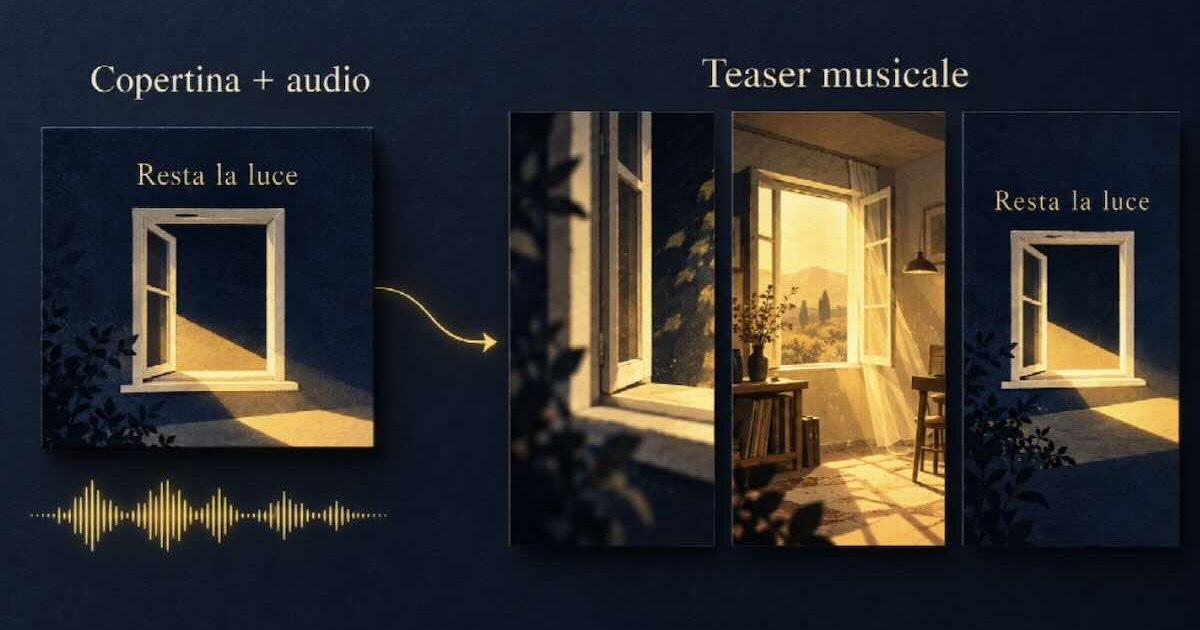
Conceptual illustration created with AI, inspired by the single imagery «Resta la luce».
The single's cover art is ready, the song already has its sound, but the video is missing to be released in the days leading up to its release. For an independent musician, Seedance 2.5 offers a way to combine the cover, the music excerpt, and other references in a single request, describe the sequence in a single prompt, and generate the complete teaser. The opening, transformation, and closing can be designed together, without having to prepare a separate clip for each step. A window drawn on the cover can open, the light can change when the drums come in, and the movement can be reminiscent of the image listeners will find on music platforms.
The outcome to be designed is a brief glimpse into the song's world. In this guide's example, the imaginary single "Resta la luce" has a midnight blue cover, a cream-colored window, and a yellow beam of light. A fifteen-second instrumental excerpt accompanies the transition from the flat graphic to an illustrated room, and then back to the cover.
The Seedance 2.5 generator , available at seedances3.com, accepts up to 50 reference materials in a single request: up to 30 images, 10 videos, and 10 audio files. For the musician, the advantage is being able to simultaneously provide the subject's appearance, the setting, a camera movement, and the sound direction, then assign each its own role in the prompt. In our teaser, the cover determines the window and colors, the room clarifies the space, and the audio directs the energy of the movement.
This concentrates preparation and generation in the same environment. It reduces the steps required to animate the cover in one place, build the room in another, and recompose the segments. Explicit references can also reduce the time spent correcting colors, shapes, or movements that were initially left to text descriptions alone, resulting in less preparation time and potential regeneration costs.
Why choose Seedance 2.5 for your single release?
The strength is being able to completely direct the video while generating it. A cover already contains decisions about shapes, colors, and atmosphere; a song excerpt contains a musical progression. Seedance 2.5 allows you to combine them in the same request and add the missing atmosphere or movement. You can ask the cover window to become the entrance to a room, keeping the drawing as a reference even during the transformation.
This ability is useful when the teaser needs to show something you haven't already filmed. The camera can enter the illustrated world of the single, the light can expand with the music, and the space can close in on the cover. The sources provide the visual and audio material; a single instruction organizes the process. The musician can thus focus on the scene to be shown, without having to construct each animated element separately.
Seedance 2.5 also supports videos up to 30 seconds in a single generation. Our example uses fifteen seconds, but the same concept could leave more space for the entrance into the room or the transition to the chorus. This length, combined with multimodal references, allows you to plan a sequence with an evolution and an ending in the same work.
The benefits continue after the first version. The cover and the song can remain in the collection while you change the excerpt for the acoustic version; the chosen clip can be modified for the release date. Reusing these bases reduces the need to re-prepare materials and instructions. The real savings come from the steps avoided and the attempts that can be more targeted: less duplicate preparation and fewer re-creations dedicated to decisions that the references have already clarified.
A cover that suggests a movement
Before uploading your files, identify the cover element that will take center stage. A window, a flower, an object, or an abstract line offer a legible starting point. For "Resta la luce," we chose a window: it's recognizable even on a small screen and allows for a simple action: opening onto a brightly lit space.
Prepare the original artwork in good quality. If you have the cover design, also export a version of the artwork without text; this will be the reference for the animated section. Save the complete cover for the closing. This way, you can ask the generator to move the illustration to the beginning and retrieve the composition with the title and artist's name at the end.
A second image can show the room you want to enter. A photo you took yourself or an illustration you can use will do the trick: it helps clarify the location of the window, floor, and wall. Specify in the prompt that you want to use this source to determine the layout of the space, while colors and lines should follow the cover. This way, a realistic photo doesn't unintentionally become the theme of the entire video.
| Material | Role in the teaser |
| Cover design without writing | Window, midnight blue, cream and yellow; animation style |
| Room image | Window position and depth of space |
| Full cover | Final composition with title and artist's name |
| Music excerpt | Pace and atmosphere of the sequence |
| Optional short camera shot | Trajectory and speed of approach to the window |
For this idea, you only need three images and an audio file, or five materials with the addition of a camera shot. The availability of 50 references leaves room for more complex projects: if your cover features an illustrated character, for example, you can add drawings of the face and body to define their appearance, keeping the image of the room separate. Each source must resolve a specific choice; filling all the slots won't automatically improve the result.
Before generating the teaser with a service like Seedance IA , prepare your own or authorized materials, including the music recording. For a promotional teaser, also check that the chosen plan includes commercial use of the generated content.
The point where the music changes
Choose the excerpt before writing the movements. Listen to the passage you'd like to share with those who aren't familiar with the single: it could be the opening of the chorus, an instrumental phrase, or the arrival of the bass after a more empty introduction. A perceptible change gives the scene a reason to move.
In our example, the guitar opens the fragment, drums and bass enter around the fourth second, and a sustained chord accompanies the closing. These are the points around which to build the video:
| Indicative time | What does it feel like? | What to ask the generator |
| 0–4 seconds | Introductory guitar | Slowly approach the cover window |
| 4–11 seconds | Drum and bass input | Opening the window, entering the room and the light spreading |
| 11–15 seconds | Final agreement | Return to the cover and brief image retention |
Link the main musical change to the opening of the window: give the generator a clear intention, without requiring a different effect on every beat. Audio sets the pace and mood; if the post needs to reproduce the exact master, link the original recording when publishing. The timing of the prompt remains director's instructions.
All references in the same project
From the website, open the Seedance 2.5 generator and select the multimodal input, indicated as M2V. Upload the cover art, the lyrics, the full cover, and the audio extract to the same media file bar. They remain in the same set of references for the entire sequence: there's no need to open a separate request for each image. You can drag and drop files from your device; already uploaded assets can be reused from the service's library.
The text must distinguish the template's take from each source. The window shape and stroke come from the first image, the layout of the space from the second, and the closure from the third. Indicating this hierarchy allows you to request a room with the structure of the photo and the look of the cover, without having to search for a new combination of adjectives each time.
For our case, choose fifteen seconds, Standard mode, and a 9:16 vertical format, turning off Smart Aspect Ratio to select it. Ask to keep the full square cover in the center and extend the blue above and below: the same graphic can accompany the video without losing the edges.
For a specific camera movement, add a short shot of the camera approaching the window and use it in Reference mode. This is another advantage of combined materials: you can show the desired trajectory and ask the generator to apply it to the drawing, rather than reconstructing it only with words. This source is added to the images and audio in the same request.
A prompt for the first teaser
In the following text, @Image1 indicates the bare drawing, @Image2 the room, @Image3 the full cover, and @Audio1 the music excerpt. Replace these names with the labels you assigned to the files in the interface. Enter the role distribution and the three time steps in the same prompt, then start the generation. The model thus receives both the visual and audio sources and instructions on when to use them; the latter indicate parts of the same video, not three jobs to be run separately.
Generate a 15-second, 9:16 vertical music teaser for the single "Resta la luce" in a single clip, using the uploaded assets together. Use @Image1 for the window design, the illustrated line, and the midnight blue, cream, and warm yellow palette. From @Image2, take only the room layout and window position. Use @Image3 as a reference for the final cover composition. @Audio1 sets the mood and the rhythm.
0–4 seconds: Start from the drawing in @Image1, with the window in the center. The camera slowly moves in; the yellow beam begins to move across the windowsill. Maintain the graphic line and colors of the cover.
4–11 seconds: At the drums' entrance in the audio cue, the window opens. The camera passes through the opening and enters the illustrated room. The yellow light spreads across the floor, with a more energetic but continuous movement. Keep the same window and the same palette.
11–15 seconds: The camera pulls back and the room gradually returns to the flat composition of the cover @Image3. Leave the title and artist name clearly visible and hold the final image for the final two seconds. Show the entire square cover in the center; extend the blue background into the areas above and below. No additional voiceover or sound effects.
If you added the camera shot, also enter this sentence in the same prompt: "Use @Video1 only for the initial approach trajectory and speed. The subject, stroke, and colors remain those of @Image1; do not capture objects or people from the reference video." This way, the video source adds a direction of motion to the same generation.
The key part is the central passage: it explains what opens, where the camera goes, and what element remains recognizable. "Exciting and cinematic video" would leave these decisions to the generator. The window that becomes a walkable space instead offers an action tied to the individual's graphic design.
When you want to change a selection, you can edit the corresponding reference or instruction. For a different room, replace @Image2; for a slower approach, change the phrase about the room. Maintaining the other sources makes the review more focused and can avoid attempts that simultaneously change style, space, and pace.
Generate the clip and watch it with the audio on your phone. Check in a single view if the movement accompanies the music, if the window remains recognizable, and if the final cover is legible.
The same song in a more composed version
An acoustic piece often requires less visual expansion. You can use the same materials and change the direction: the camera stays in front of the window, the curtain moves, and the light slowly changes. The audio still sets the tone, but the image leaves more room for listening.
To get this variant, replace the middle part of the prompt with:
4–11 seconds: The camera remains outside the window. A cream-colored curtain slowly moves, and the yellow light grows on the windowsill, following the opening music of @Audio1. Keep the shot tight, without crossing the window. Maintain the linework and palette of @Image1; return to the cover art of @Image3 at the end.
If you're creating an acoustic version of the same single, also replace the excerpt with the correct arrangement. Retaining the imagery helps maintain the visual connection between the two releases; changing the sound source and movement helps distinguish them.
Preparing the video for release day
The approved teaser can become the basis of the video to be published once the single is available. Upload the clip to the generator, choose Edit, and focus the request on the closing, while maintaining the opening and camera path.
A concrete request is: "Change the ending of @Video1 to between 11 and 15 seconds. Keep the window, palette, and cover composition. Add the text "Listen to the new single" under the title, in a cream color, centered and legible. Keep the actions from the previous part and the video duration."
This second version has a specific purpose: before the release, the audience recognizes the drawing and hears a preview; on the day of the release, they find the same video with an invitation consistent with the song's availability. You can prepare the variant starting from the chosen clip, without rewriting the entire scene.
More content to create with the same references
Seedance 2.5 can also serve more than just the music teaser. By gathering the materials and indicating each role in the prompt, you can develop other content for the artist's project and its promotion:
- Animated album covers. Use the album artwork, illustration details, and an original excerpt to generate a short animation featuring moving light and shapes, to be used in the album presentation.
- Concert promotion. Combine the poster, images of the stage or venue, and a musical snippet to create an animated performance announcement that captures the visual vibe of the artist.
- Videos inspired by the song's lyrics. Insert a verse into the prompt and place images of places or objects that recall its meaning alongside it, to generate a sequence that accompanies the listening through images.
- The artist's social media content. Authorized portraits, cover colors, and original audio can guide short vertical videos to showcase a release or new arrangement with a recognizable style.
- Product and merchandise ads. Photos of the item, details of the material, and a reference to the setting can be turned into a video that shows the product up close and describes its use, such as a band T-shirt.
- Animated event invitations. Start with the invitation design and images of the space or its decor, then describe the opening and the display of information to create a short invitation to share on your phone.
Breaking News
Naples, the 18th-century fresco in Santa Luciella has been restored: the "pezzentelle souls" resurface.
A crack in the plaster, initially perhaps mistaken for a trace of humidity, has revealed a precious… Read more
Railway maintenance worker in Naples: Gi Group is seeking one temporary position.
Job offer in Naples for a temporary railway maintenance worker: 1 position, fixed-term contract… Read more
'Nonno Ascoltami!' arrives in Naples: prevention takes to the streets on Sunday, October 18th.
According to the World Health Organization (WHO), over 1,5 billion people worldwide live with… Read more
Naples also occupied the Alberti High School. Students say, "Destroy the CPRs, not our schools."
Another school occupied in Naples. This time the protest started at the Leon Battista High School... Read more
Naples, raid at Case Nuove: drug dealer arrested
Naples - A 28-year-old man was arrested by the State Police on charges of possession… Read more
Herculaneum: Winter opening hours at the Archaeological Park begin October 15th; two domus reopen on October 21st.
From October 15, 2026, the Herculaneum Archaeological Park will observe winter hours with gates open… Read more

National Newspaper
Registration No. 1301 of 2016 – ROC 030531
Director: Giuseppe Del Gaudio
To contact the editorial staff click HERE |
Download our Official ANDROID APP
